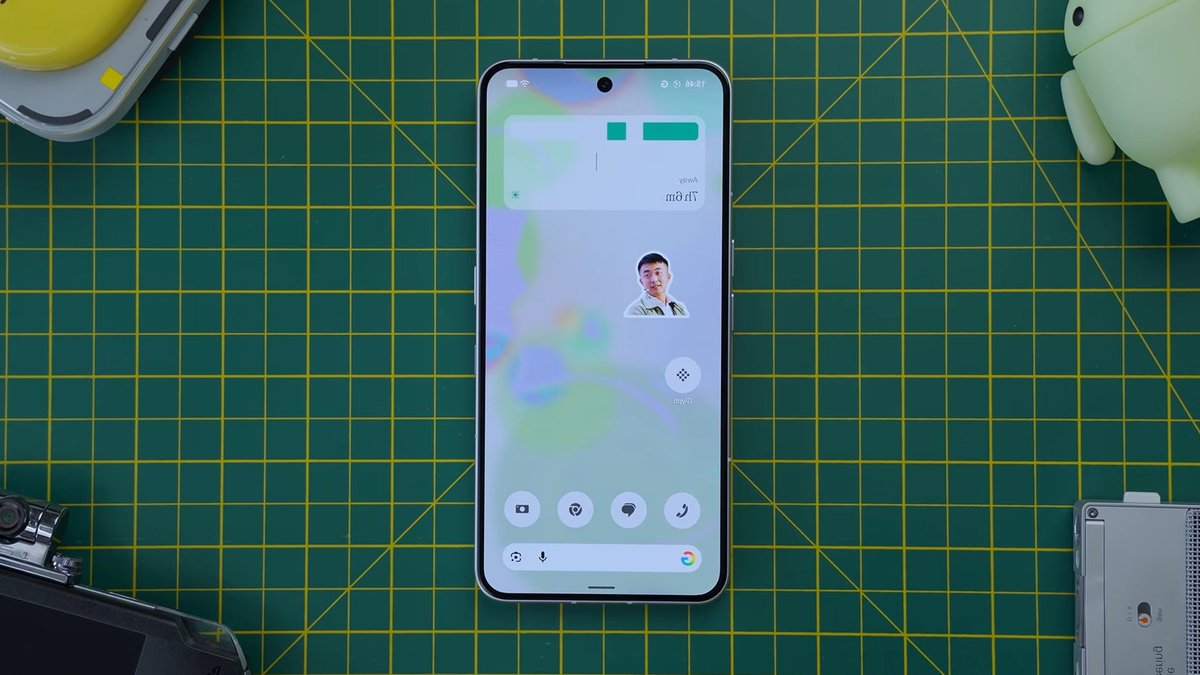
Nothing Phone users are in for a treat with the release of Nothing OS 5.0, which began rolling out to Phone (3) in mid-October. The update is expected to reach Phone (4a) Pro, Phone (4a), Phone (3a) Pro, Phone (3a), Phone (2a) Plus, and Phone (2a) in November, while users of Phone (4b), Phone (3a) Lite, and CMF Phone 2 Pro will have to wait until late December to mid-January.
The latest update is powered by Android 17, bringing several handy features that were previously missing from Nothing Phones. Additionally, Nothing has added its own tweaks, particularly for customization. One of the key features of Nothing OS 5.0 is the Translucent theme, which gives folders and widgets a frosted-glass look, allowing them to blend better with the background.
Home Screen and System Customization
To apply the Translucent theme, users can press and hold a space on the home screen, choose Customization, and then switch to the Translucent tab under Theme & Style. The theme also allows users to choose an accent color and icon pack from the available options. However, the theme does not make home screen apps translucent, although users can use translucent icons from the Nothing community as a workaround.
Another feature introduced in Nothing OS 5.0 is batch editing, which allows users to select multiple apps or widgets and drag them to a new spot on the same page or to a completely different home screen page. This can be done by long-pressing the home screen and selecting the Arrange option. The update also includes a new typeface option called Geist, which can be set as the default font across the system by opening Settings and tapping Display.
The lock screen has also been improved in Nothing OS 5.0, with two new ways to customize it: switching to one of the two new clock faces or changing the clock face color, size, and position. The new clock faces, Micrographics and Gooey, can be accessed by going to Customization in the Settings app and swiping to change to the Lock screen settings. Users can then tap on their lock screen and select the clock to view the new options.
Read Also: Onyx Boox Note Air6 C: Color E Ink Tablet Balances
In the same Clock face panel, users can choose the size, position, and color of the clock face. The color options are based on the user’s wallpaper, creating a more cohesive lock-screen aesthetic. Once the changes are made, users can tap Done to save their changes. The update also adds three new widgets: Away Time, Collector, and Glyph Timer, which can be added to the home screen or lock screen.
New Widgets and Features
The Away Time widget monitors how long the user doesn’t use their phone, providing a useful counterpoint to the built-in Screen Time feature. The Collector widget creates a sticker out of an object from the user’s photos and pastes it on the home screen or lock screen. The Glyph Timer widget allows users to run a timer straight from the home screen, with a freely adjustable duration and an hourglass animation in the Glyph Interface.
Nothing OS 5.0 also introduces a brand-new setting that separates Quick Settings and the Notification Center, making it easier for users to access their notifications and Quick Settings tiles. This setting can be enabled by opening Notifications in the Settings app, tapping on Notifications and Quick Settings, and setting it to Separate.
The torch’s brightness can now be adjusted to the user’s liking, with a floating panel appearing on the screen to allow users to slide the light up or down to increase or decrease the brightness. There’s also an Off button to quickly switch off the torch. This feature is particularly useful in situations where a soft light is preferred, such as checking on a baby in a dark nursery or reading a book in bed.
With the release of Nothing OS 5.0, Nothing Phone users can look forward to a more personalized and intuitive experience. The update’s focus on customization and usability is a significant improvement over previous versions, making it an exciting time for Nothing Phone users.



Leave a Reply